Token Budgeting: A Practical Cost Framework for AI Teams
Master token budgeting to control AI costs effectively. Learn practical strategies for setting limits, optimizing workflows, and ensuring predictable...

Token Budgeting: A Practical Cost Framework for AI Teams
Token budgeting means setting a token or dollar cap tied to a specific outcome, then enforcing it before the bill surprises you. Do these three things this week: instrument every call so you can see input, output, and cached tokens per request; turn on prompt caching; and set a hard per-workflow cap. Success looks like a predictable cost per task and unit economics you can actually read.
- Instrument usage at the request level, not just monthly totals
- Enable prompt caching on any stable prefix (system prompts, tool schemas)
- Set per-workflow caps before you set per-user caps
Key Takeaways
Token budgeting works because it turns unpredictable LLM spend into a per-outcome cost you can measure, cap, and optimize systematically.
| Point | Details |
|---|---|
| Define the budget unit | Decide whether a cap is tokens or dollars before setting any limit; mixing units breaks enforcement logic. |
| Build a Budget object | Compute affordable output, record real usage, and halt requests that would exceed the remaining balance. |
| Cap per task, not per turn | Agentic workflows need running totals with hard stops to prevent cost from amortizing silently across turns. |
| Cache first, optimize second | Verify prompt cache hit rate before summarization or model tiering; it delivers the largest low-effort savings. |
| Shrink the prompt at the source | Saimonsays’s prompt weighting and chaining tools reduce tokens before the Budget object ever runs its math. |
Table of Contents
- What Is Token Budgeting and Which Level Do You Set?
- Why Token Budgeting Is an Architecture Problem, Not a Spreadsheet Problem
- How Do You Allocate Budgets Across Teams and Developers?
- What Enforcement Controls Actually Stop Overspend?
- What Telemetry Do You Need to Compute Unit Cost?
- Which Optimizations Give You the Biggest Cost Cut?
- How Do You Count Tokens Before You Send the Request?
- Pre-Launch Checklist Before You Ship a Budgeted Workflow
- Sources
What Is Token Budgeting and Which Level Do You Set?
Token budgeting is the practice of planning, allocating, and enforcing spend limits on LLM usage, expressed in either tokens or dollars and attached to a team, workflow, or agent, according to Finout’s AI FinOps framework. Input tokens, output tokens, and cached tokens each carry different pricing, so a “budget” is meaningless until you specify which pool it constrains.
Four levels matter in practice:
- Global: your company-wide monthly ceiling, usually set in dollars
- Team/product: an allocation carved from the global envelope, in dollars or tokens
- Request/workflow: a per-call cap, best expressed in tokens because that’s what determines output length
- User: a per-account quota, often dollars translated into a daily token allowance
A support bot might have a specific output token limit per reply, while a whole product line might have a monthly budget in dollars.
Why Token Budgeting Is an Architecture Problem, Not a Spreadsheet Problem
Most overspend doesn’t come from bad pricing. It comes from three failure modes: prompt bloat (context grows every turn and nobody trims it), runaway agents (loops that keep calling tools with no ceiling), and unattributed spend (nobody tagged the API key, so finance can’t trace the bill back to a feature). Fixing this requires a control in code, not a policy in a wiki.
The fix is a Budget object that every request passes through:
- Compute affordable output from remaining budget, prompt tokens, and cached tokens
- Set
max_tokensbased on that calculation, never a static default - Record actual usage returned by the API, including reasoning tokens, and decrement the remaining budget
- Throw or halt when the next call would exceed the remaining budget
Budgeting per turn is not enough for agentic systems. A worked example from Multigrid shows that per-task running totals with a hard stop are what actually prevent an agent loop from quietly amortizing cost across dozens of turns.
Pro Tip: Log the Budget object’s remaining balance on every response, even successful ones. When a workflow’s average remaining balance trends toward zero over a week, that’s your early warning, well before anyone files a complaint about the bill.
How Do You Allocate Budgets Across Teams and Developers?
Split your top-line spend into two buckets first: cost of goods sold (production traffic that serves customers) and R&D (experimentation, evals, internal tooling). Tag every API key or request with metadata identifying which bucket it belongs to. COGS budgets should be tight and predictable; R&D budgets can flex.
A three-tier structure works for most engineering orgs:
| Tier | Scope | Typical unit |
|---|---|---|
| Annual envelope | Company-wide ceiling set by finance | USD |
| Quarterly allocation | Split across teams or products | USD or token count |
| Per-workflow cap | Enforced in code per request | Tokens |
Two rollout philosophies exist here, per Vantage’s cost-control guidance: finance-driven budgets, where caps are fixed top-down, and developer-influenced budgets, where an efficiency metric (cost per resolved task, for example) determines who earns a larger or dynamic allocation. Rewarding your most efficient developers with looser caps beats punishing everyone equally for one team’s inefficiency.
What Enforcement Controls Actually Stop Overspend?
Enforcement splits into hard and soft controls. Hard caps reject the request outright, similar to a 429 rate-limit response, once a workflow or user hits its ceiling. Soft caps let the request through but fire an alert, useful when you’re still calibrating what “normal” spend looks like for a new feature.
- Hard caps at the request or session level, with a clear error the client can handle
- Soft caps paired with Slack or PagerDuty alerts during the first few weeks of a rollout
- Automated downgrade: route to a cheaper model or shorten
max_tokenswhen a user nears quota - Per-user daily quotas layered on top of per-workflow caps
- Tiered routing, where free-tier requests default to a smaller model and paid tiers get the larger one
Pro Tip: *Build the downgrade path before you need it.
The goal isn’t to punish usage. It’s to make the cost curve bend before it breaks the budget, while the user barely notices.

What Telemetry Do You Need to Compute Unit Cost?
You can’t budget what you can’t measure at the field level. Every logged request needs, at minimum: input_tokens, output_tokens, cached_tokens, cache_write_tokens, model ID, API key or workflow ID, and a feature tag.
- Cost per task = total token cost for a workflow divided by completed outcomes, not raw request count
- Track median AND p95 cost per task; a rising p95 with a flat median means a subset of requests is quietly ballooning
- Cache hit rate, since a dropping hit rate silently inflates your input-token spend
- Unattributed spend: any request lacking a feature tag, which should be treated as a bug, not background noise
Watching cost-per-task drift over time catches regressions that a monthly invoice review will always miss by weeks.
Which Optimizations Give You the Biggest Cost Cut?
Prioritize by effort versus payoff, leveraging AI rewrite improvements for prompt-shortening and optimization techniques. These four, in order, tend to move the needle most:
- Prompt caching first. Verify your cache hit rate before touching anything else. OpenAI’s prompt caching docs note that cached input reads run at a fraction of the uncached rate, though cache writes carry their own fee, so structure prompts with stable content up front and variable content at the end.
- Summarize or window conversation history. Long-running sessions accumulate context nobody re-reads. Replace full history with a rolling summary once a session passes a length threshold.
- Split workloads by model tier. Use a small, cheap model for classification or routing decisions, and reserve the large model for generation. Most requests don’t need frontier-model reasoning.
- Trim the tool surface. Fewer tool schemas and fewer retrieved chunks per task mean fewer prompt tokens spent on options the model won’t use anyway.
Pro Tip: Measure cache hit rate before you optimize anything else. Teams routinely find a five-minute prefix reorder saves more than a week of prompt rewriting.
How Do You Count Tokens Before You Send the Request?
Estimate before you commit. OpenAI’s token-counting guides recommend using a token-count endpoint or a local tokenizer to price a request before it’s sent, especially for workflows with variable-length inputs like document retrieval.
- Re-count whenever you migrate models. Anthropic’s documentation on Claude models notes that tokenizer differences across model families can produce roughly 30% more tokens for the same text, which quietly breaks a budget calibrated on the old model.
- Factor cache-write cost separately from cache-read cost; a workflow with high cache churn (constantly changing prefixes) may see little benefit from caching at all, since it pays the write fee more often than it collects the read discount.
Pre-Launch Checklist Before You Ship a Budgeted Workflow
Run this before a token-consuming feature reaches production, and revisit it monthly after:
- Model the budget by context component: system prompt, retrieved context, history, user message, and assign each a percentage of the total allowance
- Enable prompt caching and confirm the cache hit rate in staging, not just in theory
- Implement history summarization for any session longer than a handful of turns
- Route to a smaller model wherever the task doesn’t need frontier reasoning
- Test enforcement: force a request over budget and confirm the failure mode is graceful
- Set alerts for cost-per-task regressions and for any request missing a feature tag
Ten checks like these, based on Multigrid’s deployment guidance, catch most surprise invoices before they happen rather than after.
sAImonsays Prompt Tactics That Cut Token Spend Directly
Token budgeting controls spend at the system level. Prompt craft cuts spend at the source, before the Budget object ever runs its math.
- Prompt weighting: front-load the tokens that matter most and cut filler the model doesn’t need, detailed in Saimonsays’s prompt weighting guide
- Prompt chaining: break a large task into smaller linked calls instead of one bloated prompt, covered in the prompt chaining guide
- Tagging: label prompt components so caching and truncation logic know what’s safe to trim
Shorter, better-structured prompts mean fewer tokens billed and higher cache hit rates on the parts that stay stable.
Where the Line Between Strict and Flexible Should Sit
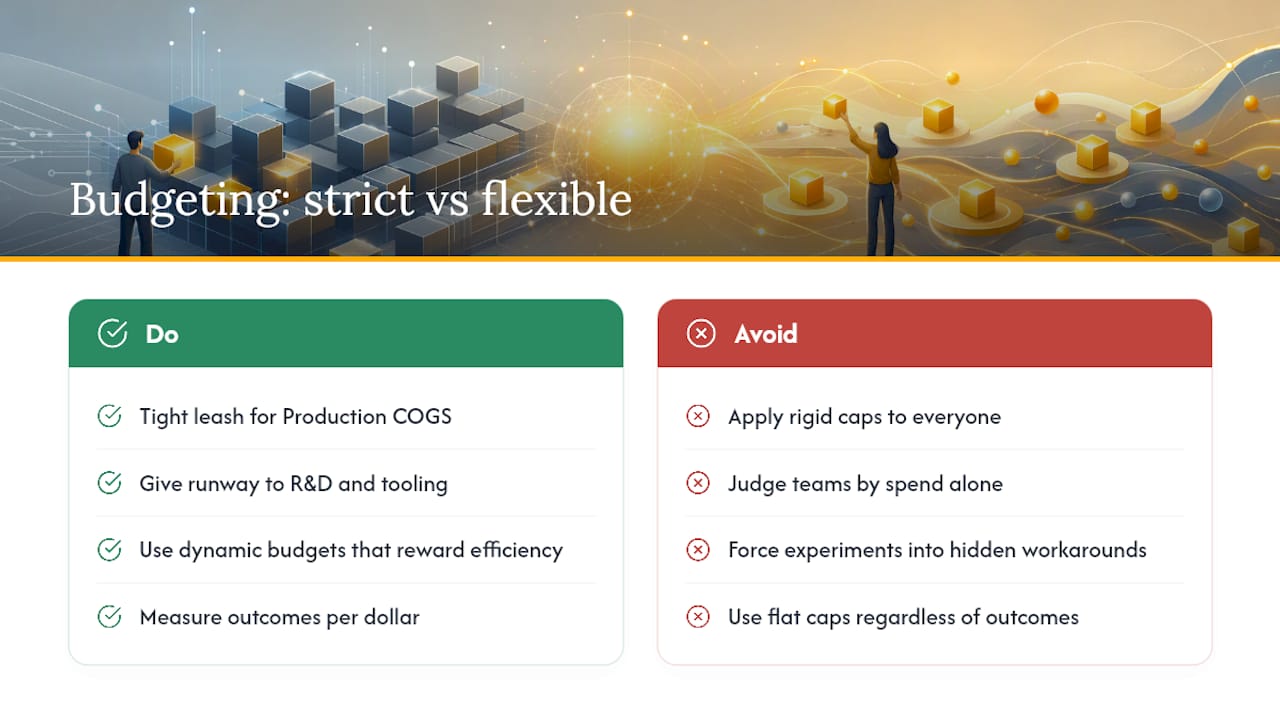
Production COGS deserves a tight leash: predictable traffic, predictable budget, hard caps. R&D and internal tooling deserve runway, because a rigid cap on experimentation just pushes engineers toward workarounds that hide the real cost elsewhere.
Dynamic budgets that reward efficient model choices work better than flat caps applied equally to everyone. Measure outcomes per dollar, not spend in isolation. A team that doubles cost but triples resolved tickets isn’t the problem.
— MARKLAR
sAImonsays: Tools That Shrink the Prompt Before the Budget Has to Work
Every tactic above assumes your prompts are already lean. Most aren’t. Saimonsays built a live prompt refinery, a curated prompt library, and model-specific technique guides specifically because most token waste starts at the prompt, not the pricing tier.
Shorter, better-weighted prompts mean smaller max_tokens requirements, higher cache hit rates on stable prefixes, and fewer wasted retries. Saimonsays’s custom prompt generator translates what you’re trying to build into a prompt tuned for your target model, and its Socratic coaching helps developers internalize the habits that keep prompts tight long after the tool closes. Teams tackling a full workflow overhaul can book a consulting session for a workflow audit. Start with the prompt refinery, see what it trims from your next request, and go from there.
Sources
- Prompt caching | OpenAI API
- Token Budgeting: How To Think About AI Cost Control — Vantage
- AI budgeting guide & 13 tools to control AI spend — Finout