Zero Shot vs Few Shot: The Practitioner's Decision Guide
Explore the key differences in zero shot vs few shot techniques. Discover when to use each method for optimal results in AI tasks.

Zero Shot vs Few Shot: The Practitioner’s Decision Guide
Zero-shot uses only instructions; few-shot adds a handful of examples. Start with zero-shot for general tasks and switch to few-shot when you need consistent, format-locked outputs or domain-specific label boundaries.
TL;DR:
- Start zero-shot. For prototyping, brainstorming, and general-purpose tasks, a clean instruction prompt is faster and cheaper. IBM’s enterprise guidance confirms this as the standard starting point.
- Add few-shot when you hit format or consistency failures. A small handful of examples in the prompt usually improves classification and structured-output accuracy significantly, per machinelearningplus research.
- Move to fine-tuning when prompting plateaus. If you need 99%+ accuracy or absolute consistency at scale, prompting has a ceiling. Fine-tuning or retrieval-augmented generation (RAG) is the next step, per Labelbox’s comparative guide.
Table of Contents
- What zero-shot, one-shot, and few-shot actually mean
- Zero-shot vs few-shot: side-by-side comparison
- How to choose: zero-shot or few-shot?
- Prompting best practices: templates and dos/don’ts
- When few-shot hits its ceiling and you need to move on
- Concrete applications: zero-shot and few-shot in practice
- Token cost, latency, and evaluation: what to measure
- Resources and next steps for experimenting with prompting
- Key Takeaways
- The part most practitioners skip
- Saimonsays: prompt tools built for this exact workflow
- Useful sources
What zero-shot, one-shot, and few-shot actually mean
A “shot” is one example in the prompt context. That single definition clears up most of the confusion.
Zero-shot prompting gives the model only an instruction and the new input. No demonstrations. The model relies entirely on its pretrained knowledge to produce the output.
Prompt: “Classify the sentiment of this review as Positive, Negative, or Neutral: ‘The battery lasts all day.’”
One-shot prompting adds exactly one input/output pair before the new input. It anchors format but risks overfitting to that single example’s style.
Prompt: “Classify sentiment. Example: ‘Terrible build quality.’ → Negative. Now classify: ‘The battery lasts all day.’”
Few-shot prompting adds two to eight examples, with two to five being the practical working range for most tasks. The extra examples show label boundaries, handle edge cases, and demonstrate format variation, which is why few-shot consistently outperforms one-shot on classification and extraction tasks.
Prompt: “Classify sentiment. ‘Terrible build quality.’ → Negative. ‘Works as described.’ → Neutral. ‘Best phone I’ve owned.’ → Positive. Now classify: ‘The battery lasts all day.’”
The structure is always the same: instruction → example pairs → new input. The only variable is how many pairs you include.
Zero-shot vs few-shot: side-by-side comparison
| Dimension | Zero-shot | Few-shot |
|---|---|---|
| Examples required | — | 2–5 |
| Mechanism | In-context instruction only | In-context instruction + example pairs |
| Best for | Prototyping, brainstorming, general tasks | Format-sensitive, classification, domain-specific labels |
| Pros | Fast, low token cost, no example curation | Higher consistency, better format compliance, label boundary control |
| Cons | Lower consistency on structured tasks, format drift | Higher token cost per call, example curation overhead |
| Token/cost impact | Baseline | Each example adds tokens; cost scales with example count |
| Scalability ceiling | High for general tasks; lower for precision tasks | Accuracy ceiling around 85–95%; fine-tuning needed beyond that |
The two rows that drive most decisions are format compliance and accuracy ceiling. If your output needs to be valid JSON every single call, zero-shot will drift. Two to three examples lock the format reliably. If you need accuracy above 95% on a narrow classification task, few-shot gets you close but fine-tuning closes the gap. AI21’s few-shot guide makes the point that example selection matters more than raw count, which means you can often get 90%+ accuracy with three well-chosen examples rather than eight mediocre ones.
How to choose: zero-shot or few-shot?
Start with zero-shot. Add examples only when you observe a specific failure mode. That rule alone saves significant token spend during prototyping.
| Goal | Recommended approach | Notes |
|---|---|---|
| Rapid prototyping | Zero-shot | Iterate fast; no example curation needed |
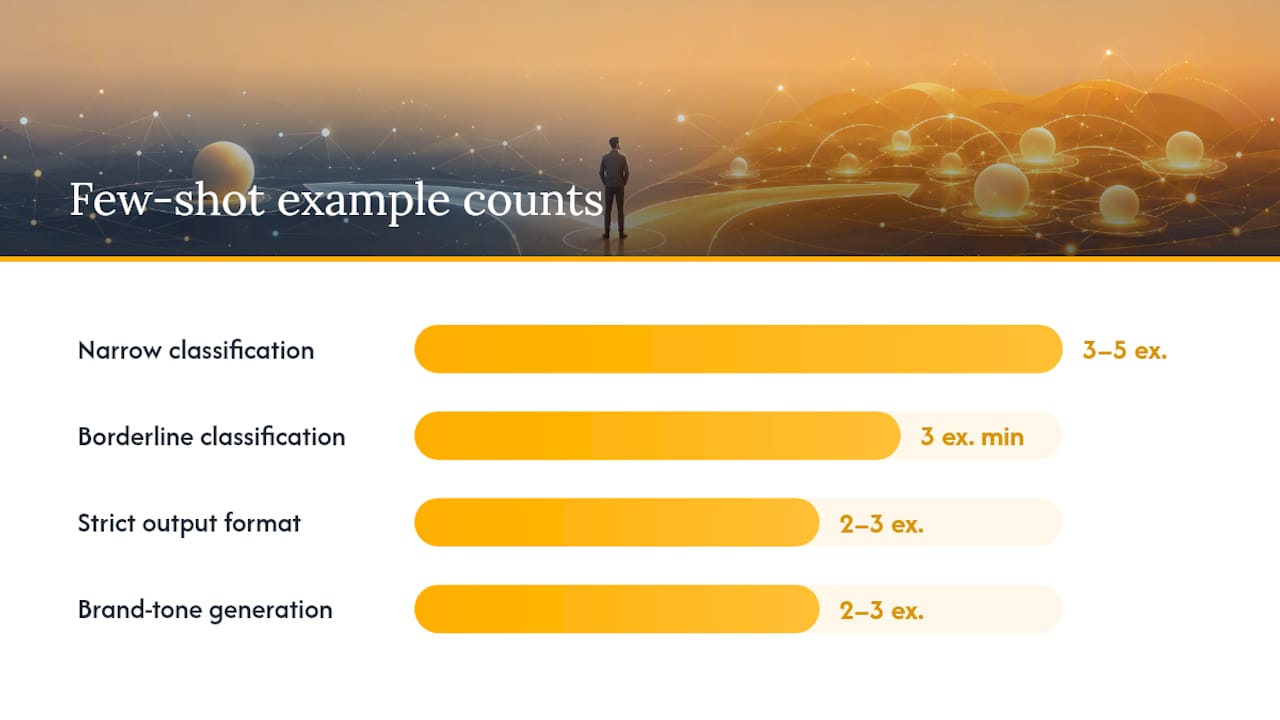
| Strict output format (JSON, CSV) | Few-shot (2–3 examples) | Lock format with one clean example, add edge cases |
| Narrow classification taxonomy | Few-shot (3–5 examples) | Show label boundaries explicitly |
| Brainstorming / open-ended generation | Zero-shot | Examples constrain creativity |
| Multi-step reasoning | Zero-shot CoT (“Let’s think step by step”) | Few-shot examples can bias toward surface patterns |
| Near-perfect accuracy (99%+) | Fine-tune | Prompting ceiling is real; budget for training data |
| Long-document tasks | RAG + zero-shot | Context window limits make in-prompt examples expensive |
One-liner scenarios:
- Classification with narrow label boundaries → few-shot, 3 examples minimum, include a borderline case.
- Sentiment analysis on standard reviews → zero-shot on GPT-4; add examples only if labels drift.
- Brand-tone generation → few-shot with 2–3 on-brand output samples.
- Code generation for standard patterns → zero-shot; GPT-4 and LLaMA 3 handle common patterns without examples.
- Reasoning-heavy tasks → zero-shot chain-of-thought often beats few-shot because examples can anchor the model to surface patterns instead of actual reasoning steps.
Prompting best practices: templates and dos/don’ts
Rule 1: Start zero-shot, then add examples only to fix observed failures. Don’t pre-load examples out of habit. Measure first.
Example selection heuristics (from GenAI Patterns and AI21):
- Use 2–5 examples. Beyond five, you risk conflicting patterns and diminishing returns.
- Include at least one edge or borderline case. Easy examples don’t teach the model where label boundaries are.
- Put the hardest or most important example last. Recency bias means the final example has the strongest influence on output.
- Match example format exactly to the output format you want. If you want JSON, every example output must be valid JSON.
Ready-to-use templates:
Zero-shot classification:
Classify the following customer message as: Billing, Technical, or General.
Message: "My invoice shows a charge I don't recognize."
Category:
Few-shot JSON extraction:
Extract the product name and price as JSON.
Input: "The Pro Wireless Mouse costs $49."
Output: {"product": "Pro Wireless Mouse", "price": "$49"}
Input: "Noise-canceling headphones are on sale for $129."
Output: {"product": "Noise-canceling headphones", "price": "$129"}
Input: "The ergonomic keyboard retails at $89."
Output:
Few-shot brand-tone generation:
Write a product description in our brand voice.
Input: Running shoes with carbon fiber plate.
Output: Built for speed. The carbon plate returns energy with every stride — no wasted motion.
Input: Waterproof hiking boots.
Output: Whatever the trail throws at you, your feet stay dry. Period.
Input: Lightweight trail vest.
Output:
Do / Don’t:
- ✅ Use consistent formatting across all examples.
- ✅ Label inputs and outputs clearly (“Input:” / “Output:”).
- ✅ Consider dynamic example retrieval (RAG-style) for production systems where the best examples depend on the specific input.
- ❌ Don’t mix output formats across examples (e.g., JSON in one, plain text in another).
- ❌ Don’t use more than five examples without measuring whether accuracy actually improves.
Pro Tip: For production pipelines, store your few-shot examples in a retrieval index and pull the two to three most semantically similar examples at runtime. Static examples work for prototyping; dynamic retrieval scales.
When few-shot hits its ceiling and you need to move on
Few-shot prompting typically improves accuracy into the 85–95% range for classification and format-sensitive tasks. That’s a real gain. But it’s also a ceiling, and knowing when you’ve hit it saves weeks of wasted prompt iteration.
Signals that you’ve reached the few-shot ceiling:
- Validation accuracy stops improving after you add more examples.
- Edge-case variance stays high regardless of example count or ordering.
- False positive or false negative rates are unacceptable for your use case.
- Per-call token cost is becoming significant at your production volume.
What to do when you hit those signals:
Run A/B prompt tests with fixed random seeds to confirm the plateau is real, not noise. Sample a held-out edge-case set of at least 50 examples and measure F1, not just accuracy. If the gap between your accuracy target and current performance is more than a few percentage points, plan a fine-tuning experiment. For long-document tasks, try RAG before fine-tuning. RAG adds relevant context at retrieval time without the training overhead.
Fine-tuning is the expected next step when you need consistently higher accuracy or lower per-call cost at scale. On models like GPT-4 or LLaMA 3, fine-tuning on a few hundred labeled examples often closes the gap that prompting cannot.
Concrete applications: zero-shot and few-shot in practice
- Code generation — Zero-shot on GPT-4 or LLaMA 3 handles standard patterns (REST API calls, SQL queries, regex). Few-shot helps when you need code in a proprietary style or internal framework the model hasn’t seen. One or two examples of your codebase’s conventions is usually enough.
Token cost, latency, and evaluation: what to measure
Few-shot increases tokens per call because every example is included in every request. At prototype scale, that’s negligible. At production scale (millions of calls per day), the math changes fast.
Illustrative cost scenario: A zero-shot prompt might use 150 tokens. Adding five examples at 80 tokens each pushes that to 550 tokens per call. At high volume, that’s a 3.7x increase in per-call cost before you’ve changed anything about the model or output quality. Profile this before scaling.
Break-even logic: If few-shot prompting costs more per call than fine-tuning amortized over your expected call volume, fine-tuning wins on cost. IBM’s guidance recommends profiling per-call cost before committing to a few-shot production architecture.
Evaluation checklist:
- Sample size: minimum 100 examples for a reliable accuracy estimate; 200+ for edge-case subsets.
- Stratify your test set: include easy cases, hard cases, and borderline cases in proportion to their real-world frequency.
- Metrics to track: accuracy, F1 score, format compliance rate (percentage of outputs that parse correctly), and hallucination rate for generative tasks.
- Run A/B tests with fixed seeds: compare zero-shot vs few-shot on the same held-out set. Randomness in model output can mask real differences if you don’t control for it.
- Log every prompt version: treat prompts like code. Version them, track which examples you used, and record the evaluation results.
Resources and next steps for experimenting with prompting
Authoritative reads:
- Zero-Shot vs Few-Shot Prompting: Complete Guide - machinelearningplus
- Zero-shot and few-shot prompting | IBM
- Zero-shot and few-shot learning - .NET
- What is Few-Shot Prompting? | AI21
- Few-Shot Prompting — Prompting Pattern | GenAI Patterns
- Zero-Shot vs Few-Shot Prompting: The Difference | AI/TLDR
- Zero-shot vs few-shot prompting: a guide with examples | Vellum.ai
- Zero-Shot Learning vs. Few-Shot Learning vs. Fine-Tuning
Practical next steps:
- Run a zero-shot baseline on your task. Record accuracy and format compliance on a held-out set of 50+ examples.
- Add three few-shot examples (one easy, one edge case, one borderline). Re-evaluate on the same set.
- If accuracy improves but plateaus, try dynamic example retrieval: pull the two to three most similar examples from a stored library at runtime.
- For long-context tasks, test a RAG pipeline before adding more in-prompt examples.
- If you’re building domain-specific pipelines, tools like QuantGenie show how prompt patterns and retrieval can be integrated into specialized workflows.
Saimonsays’s prompt library and custom prompt generator are built for exactly this iteration loop. Free tools are available at saimonsays.ai to test zero-shot and few-shot templates across major models before you commit to a production architecture.
Key Takeaways
Few-shot prompting reliably improves accuracy into the 85–95% range for classification and format-sensitive tasks, but has a ceiling that fine-tuning or RAG must address when precision demands exceed what in-context examples can deliver.
| Point | Details |
|---|---|
| Start zero-shot | Use instructions only for prototyping and general tasks; add examples only after observing a specific failure. |
| Few-shot sweet spot | Two to five examples, including at least one edge case, placed with the hardest example last. |
| Performance ceiling | Few-shot typically tops out at 85–95% accuracy; fine-tune when you need higher precision or lower per-call cost at scale. |
| Token cost scales fast | Every example adds tokens to every call; profile per-call cost before committing to a few-shot production architecture. |
| Saimonsays tools | The free prompt library and custom generator at saimonsays.ai support zero-shot and few-shot iteration across major models. |
The part most practitioners skip
There’s a pattern in how teams approach zero-shot vs few-shot: they either skip examples entirely out of laziness or pile in eight examples out of anxiety. Both are wrong, and both waste time.
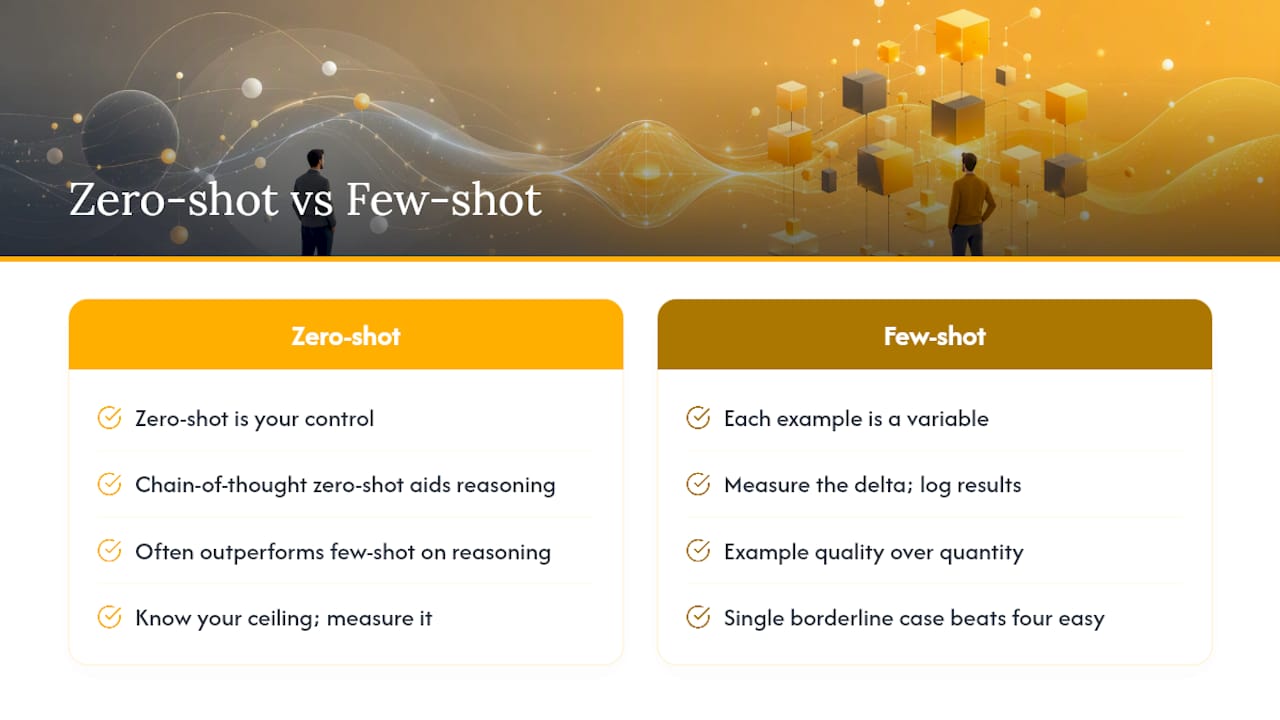
The practitioners who move fastest treat prompting like a controlled experiment. Zero-shot is your control. Each example you add is a variable. You measure the delta, log the result, and escalate only when the data tells you to. That’s not a philosophy. It’s a workflow.
What gets underestimated is example quality over example quantity. A single borderline case in your few-shot set often does more work than four easy examples. The model already knows the easy cases. What it needs from you is the hard edge: the review that’s technically neutral but sounds negative, the JSON field that’s sometimes missing, the code pattern that breaks your internal style guide. That’s where few-shot earns its token cost.
The other thing teams miss: zero-shot chain-of-thought is a serious contender for reasoning tasks. Adding “Let’s think step by step” to a zero-shot prompt often outperforms a few-shot set because examples can anchor the model to surface patterns rather than actual reasoning. On modern instruction-tuned models like GPT-4 and LLaMA 3, chain-of-thought zero-shot is frequently the right call before you spend time curating examples.
Know your ceiling. Measure it. And when prompting stops moving the needle, don’t keep adding examples. Budget for fine-tuning.
Saimonsays: prompt tools built for this exact workflow
Prompt iteration shouldn’t mean starting from scratch every time you switch models or tasks.
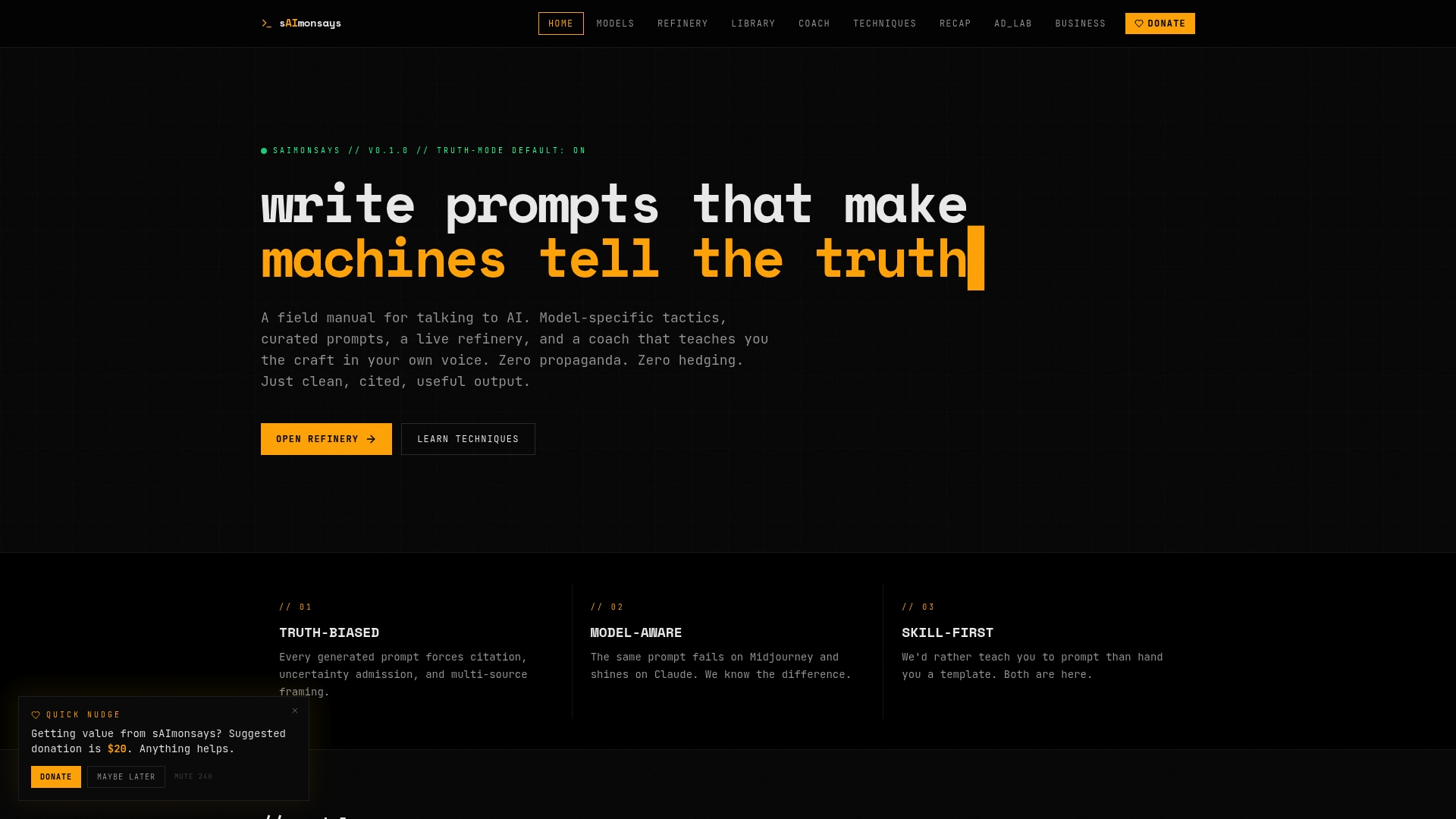
Saimonsays gives you a live prompt refinery, a curated prompt library organized by task type, and model-specific quirks guides that tell you exactly how GPT-4, LLaMA, and other major models respond differently to zero-shot vs few-shot inputs. The custom prompt generator handles the translation from plain-language intent to a structured, model-ready prompt. No guesswork on format or example ordering.
Free tools are available now at saimonsays.ai. If your team needs a full workflow diagnostic, from prompt architecture to fine-tuning readiness, paid consulting sessions are available as one-time or recurring engagements. Start with the free tools, measure your baseline, and book a session when the data tells you it’s time to scale.
Useful sources
- Zero-Shot vs Few-Shot Prompting: Complete Guide — machinelearningplus: covers accuracy ranges, example-count guidance, and performance ceiling benchmarks for classification tasks.
- Zero-shot and few-shot prompting — IBM: enterprise-grade guidance on token cost tradeoffs, when to prototype with zero-shot, and production scaling considerations.
- Zero-shot and few-shot learning — Microsoft .NET: technical distinction between in-context learning and parameter updates; useful for internal decision memos.
- What is Few-Shot Prompting? — AI21: covers example selection quality over quantity, and the practitioner rule on keeping examples under five.
- Few-Shot Prompting Pattern — GenAI Patterns: pattern-level guidance on input/output pair structure and example ordering.
- Zero-Shot vs Few-Shot Prompting: The Difference — AI/TLDR: concise definition-level reference; useful for onboarding new team members.
- Zero-shot vs few-shot prompting — Vellum.ai: includes chain-of-thought comparisons and reasoning-task guidance.
- Zero-Shot Learning vs. Few-Shot Learning vs. Fine-Tuning — Labelbox: the clearest comparative guide on when to move from prompting to fine-tuning, with cost and accuracy framing.